AlwaysNear App SMS Consent (CTA / Opt-in Proof)
What this program is
- Program/Brand name: AlwaysNear App
- Company: Zonafy LLC
- Use case: Transactional emergency/status updates only (non-marketing).
- Consent method: After an account owner adds a contact, the recipient must reply "YES" to opt in before receiving any status updates.
- Message and data rates may apply.
- Message frequency varies.
- Reply HELP for help. Reply STOP to opt out.
- Terms: https://www.alwaysnearapp.com/terms
- Privacy: https://www.alwaysnearapp.com/privacy
- Opt-in proof (this page): https://www.alwaysnearapp.com/sms-consent
- Support: support@alwaysnearapp.com
- No marketing/promotional messages.
Exact message text used
A) Invitation SMS (CTA)
AlwaysNear App: You were added as an emergency contact for [User Name]. Reply YES to receive emergency/status updates. Message frequency varies. Message and data rates may apply. Reply STOP to opt out, HELP for help.
B) Opt-in confirmation (sent immediately after YES)
AlwaysNear App: You're opted in to receive emergency/status updates for [User Name]. Message frequency varies. Message and data rates may apply. Reply STOP to opt out, HELP for help.
C) HELP auto-reply
AlwaysNear App: For help, email support@alwaysnearapp.com. Message frequency varies. Message and data rates may apply. Reply STOP to opt out.
D) STOP confirmation
AlwaysNear App: You are unsubscribed and will no longer receive emergency/status updates. Reply START to resubscribe. Message and data rates may apply.
Consent checkbox requirement (in-app)
- The consent checkbox is unchecked by default.
- The user must manually check it.
- The "Add contact" / "Save" action is disabled until checked.
- Only after checking does the app send the one-time invitation SMS.
Twilio reviewers: this checkbox is required before an invitation SMS is sent.
Add contact (in-app mock)
In-app consent screenshot
When an account owner adds a contact, AlwaysNear App sends ONE invitation SMS asking for consent. The contact must reply YES to opt in.
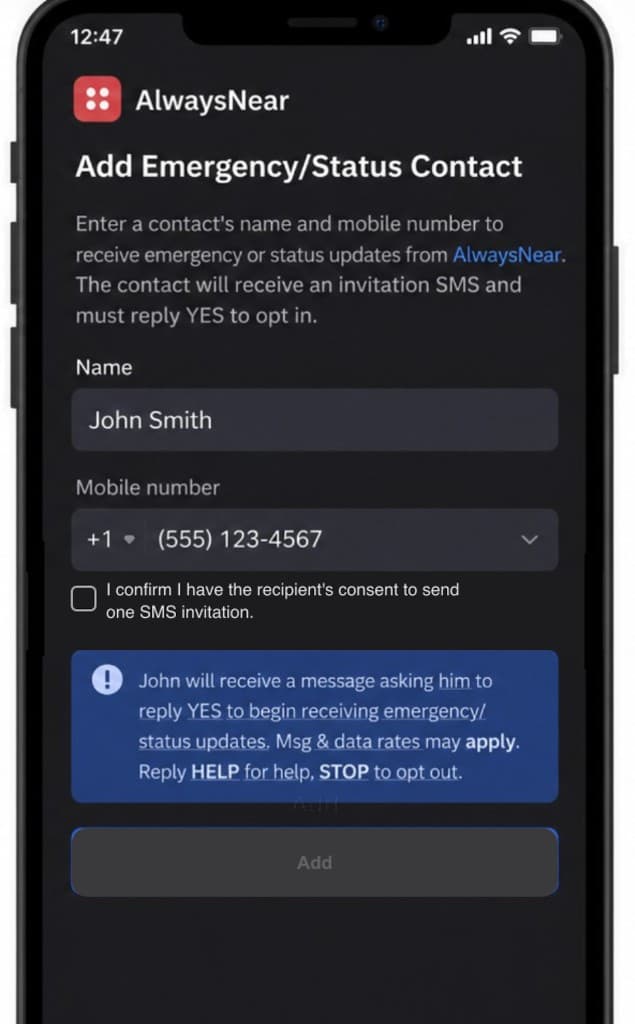
Consent is requested before any status updates are sent.
FAQ
- How do I opt in?
- Reply YES to the invitation SMS from AlwaysNear App. You will not receive any status updates until you opt in.
- How do I stop messages?
- Reply STOP to opt out. You will receive a confirmation and no further messages will be sent.
- Is this marketing?
- No. AlwaysNear App sends only transactional emergency/status updates. No marketing/promotional messages.
Carriers are not liable for delayed or undelivered messages.
Last updated: 2025